Optivue™ – Clear Image Drawing Reflection Tool (50% Off)
Draw What You See—Even If You Can’t Draw
You don’t need talent—you just need Optivue™.
In just minutes, you’ll be tracing dreamy summer scenes, custom portraits, and swoon-worthy art straight from your phone onto paper.

No stress. No pressure for perfection.
Just you, a crystal-clear reflection, and the quiet joy of creating something beautiful with your own hands.
It's like magic for your inner artist—whether you’re 12 or 42.

Loved by beginners and seasoned sketchers alike
✓ DRAW CONFIDENTLY—EVEN IF YOU’RE A BEGINNER
See your image projected clearly through the lens and trace over it with ease—no guesswork, no frustration.

✓ TURN ANY PHOTO INTO A SKETCH
Use the free app to transform any picture into a custom outline—perfect for portraits, pets, or Pinterest art.

✓ CREATE SOMETHING BEAUTIFUL IN UNDER 10 MINUTES
Set up your phone, load your image, and start drawing in just a few taps—it’s that simple.

✓ A SCREEN-FREE, STRESS-FREE HOBBY
Step away from endless scrolling and enjoy peaceful, hands-on creativity you can see and hold.

Press "ADD TO CART” now to receive 50% Off on Optivue™! This offer is available for a limited time only!
What people think
| Feature | Optivue™ | Phone projector | Tracing paper |
|---|---|---|---|
| No image distortion | ✓ | ✗ | ✓ |
| Works in daylight | ✓ | ✗ | ✓ |
| App-generated outlines | ✓ | ✗ | ✗ |
| No printer or ink needed | ✓ | ✗ | ✗ |
| Reusable setup | ✓ | ✓ | ✗ |
Frequently asked questions
Can I use it without any drawing skills?
Yes! Optivue™ is made for beginners. The image is reflected clearly so you can simply trace over it with no artistic background needed.
Does it work with iPads or only phones?
It works with both smartphones and tablets, as long as the device fits securely on the included stand.
Can I trace photos of people or pets?
Absolutely. You can upload any image into the app—including portraits, pets, or scenery—and convert it into a sketch outline.
Do I need to buy special paper or pens?
No, you can use any opaque drawing surface and your favorite pens or pencils. No need for special materials.
How to use
- Download the app and upload your image.
- Choose the sketch style you like best.
- Place your phone or tablet on the stand, and adjust the lens over your drawing surface.
- Trace the reflected image directly onto your paper.
Specifications
- Size: 12 inches
- Material: PMMA optical lens, ABS frame
Original: $29.99
-70%$29.99
$9.00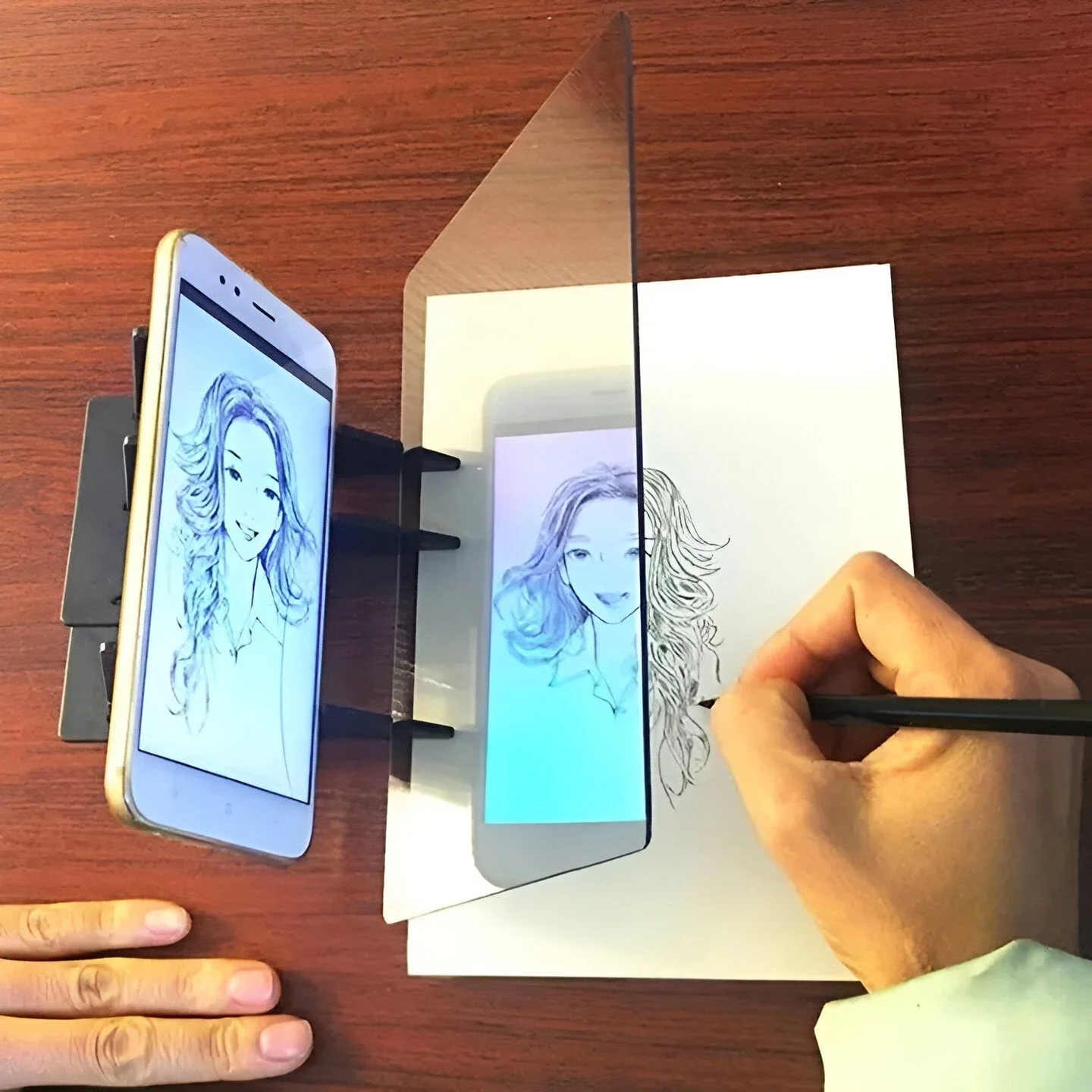


Description
Draw What You See—Even If You Can’t Draw
You don’t need talent—you just need Optivue™.
In just minutes, you’ll be tracing dreamy summer scenes, custom portraits, and swoon-worthy art straight from your phone onto paper.
No stress. No pressure for perfection.
Just you, a crystal-clear reflection, and the quiet joy of creating something beautiful with your own hands.
It's like magic for your inner artist—whether you’re 12 or 42.
Loved by beginners and seasoned sketchers alike
✓ DRAW CONFIDENTLY—EVEN IF YOU’RE A BEGINNER
See your image projected clearly through the lens and trace over it with ease—no guesswork, no frustration.
✓ TURN ANY PHOTO INTO A SKETCH
Use the free app to transform any picture into a custom outline—perfect for portraits, pets, or Pinterest art.
✓ CREATE SOMETHING BEAUTIFUL IN UNDER 10 MINUTES
Set up your phone, load your image, and start drawing in just a few taps—it’s that simple.
✓ A SCREEN-FREE, STRESS-FREE HOBBY
Step away from endless scrolling and enjoy peaceful, hands-on creativity you can see and hold.
Press "ADD TO CART” now to receive 50% Off on Optivue™! This offer is available for a limited time only!
What people think
| Feature | Optivue™ | Phone projector | Tracing paper |
|---|---|---|---|
| No image distortion | ✓ | ✗ | ✓ |
| Works in daylight | ✓ | ✗ | ✓ |
| App-generated outlines | ✓ | ✗ | ✗ |
| No printer or ink needed | ✓ | ✗ | ✗ |
| Reusable setup | ✓ | ✓ | ✗ |
Frequently asked questions
Can I use it without any drawing skills?
Yes! Optivue™ is made for beginners. The image is reflected clearly so you can simply trace over it with no artistic background needed.
Does it work with iPads or only phones?
It works with both smartphones and tablets, as long as the device fits securely on the included stand.
Can I trace photos of people or pets?
Absolutely. You can upload any image into the app—including portraits, pets, or scenery—and convert it into a sketch outline.
Do I need to buy special paper or pens?
No, you can use any opaque drawing surface and your favorite pens or pencils. No need for special materials.
How to use
- Download the app and upload your image.
- Choose the sketch style you like best.
- Place your phone or tablet on the stand, and adjust the lens over your drawing surface.
- Trace the reflected image directly onto your paper.
Specifications
- Size: 12 inches
- Material: PMMA optical lens, ABS frame